# PLT Fivem Developments
Hello and welcome to my gitbook.
All the scripts i coded are ready to use for **ESX & QB-Core**. For other frameworks check out the topic of promotion or contact to me via discord.\
I deliver scripts with **CFX Asset Escrow System**, those are licensed on your cfx account that you entered when purchasing. Only some parts of them are encrypted. You can still configure alot of things in the open parts and the config file.
{% embed url="" %}
You can communicate with me quickly and be informed about everything by joining my discord,
{% endembed %}
{% embed url="" %}
You can review the videos of all my scripts on my channel.
{% endembed %}
{% embed url="" %}
You can buy my scripts on my tebex store.
{% endembed %}
{% embed url="" %}
You can review all my topics on the fivem forum here.
{% endembed %}
# Lumberjack JOBS
Script has 3 different stages (jobs) and all the stages are independent. For example players can only do the wood cutting job and they don't have to continue and finish the rest of the jobs.
## Job Requirement
You can set whether players need a profession to be able to the work. You can even set it to require different professions for each of the 3 jobs. For example; 'lumberjack' for tree cutting works, 'operator' for stacking pallet of lumbers and 'driver' for delivery of lumbers. In addition, you can set the grades you want to be able to do the work.
## Tree Cutting Works
Script gives the telehandler and the chainsaw to players. chainsaw is automatically given to player's hand when player gets out of vehicle. The player has to go to a tree that can be cut, does all the cutting of the tree, loads the cut wood into the telehandler, leaves the wood in the stand, can cut a new tree without delivering the telehandler if the player wants, the money is paid when the telehandler is delivered.
## Stacking Pallet of Lumber Works
Script give forklift to player. Player can park the forklift on a suitable trailer if there are any or can pickup a pallet of lumber with the forklift from stand and loads on a suitable trailer if there are any available. The money is paid when the forklift is delivered.
## Delivery of Lumbers Works
The players goes to a construction site of their choice with a truck loaded with pallet of lumbers, delivers the pallet of lumbers and returns the truck to the place where they took it. They receive a fixed fee for the work and an extra fee for the distance of the construction they delivered.
## Things to Know.
* ### Script Operation and Settings:
* Trees that have been cut appear as cut on other players as well. Will respawn after xxx minutes.
* You can specify the minimum number of cuttable trees you want always to be on the map from the config. If the number of cuttable trees falls below this number, the system automatically completes the number of cuttable trees by adding cuttable trees equal to this number without checking the respawn timer.
* The logs left on the stand after cutting the tree are added to the other stand as a pallet of lumber.
* The pallet of lumbers taken from stand and loaded onto the truck decreases from the stand.
* The system automatically adds new pallet of lumbers to the stand when the pallet of lumbers in the stand fall below the value you set in the config. This is optional, you can turn it off or on dependin of your choice.
* If there is no pallet of lumbers left in the stand, this work cannot be done. someone has to do the wood cutting and drop the woods at the stand.
* Pallet of lumbers must be loaded on the trailer before the delivery work can be done.
* You can set it as forklifts are always parked automatically on top of the truck. That way there won't be an extra parking forklift jobs.
* ### Player Commands:
* `PLT.CommandSetVolume = "chainsawvolume"`; set the chainsaw voice level.
* `PLT.CommandFixVehicle = "fixjobvehicle"`; fix position of the only job's vehicle.
* `PLT.CommandCancelJob = "canceljob"`; cancel the ongoing job.
* ### Cancellation of ongoing work:
* Getting too much damage to job's vehicles.
* Moving too far from script objects.
* If player disconnect from game.(In this case, all entities that have spawned for the player are deleted.)
# Technical information
## CPU Usage
* 0.00ms when the player is away from job area. Only when another player does something that needs to be synchronized on the size (like: Falling tree or pick lumber from stand) will momentarily go up to 0.01 ms and fall backs again.
* On average, 0.04ms while the player is working
* 0.1ms only when in Falling tree, logs rolling on stand and pallet of lumber moving on stand affected animations. If you set the value of `PLT.LessCpuUsage = true from config.lua` the usage will stay 0.04ms, but the animations effect will not be realistic.
## Modelling
* The platform made for parking the trucks is designed by [@Rotto](#credits) and I made a lot of adjustments in the field.
* Trees and chainsaw objects were designed by [@BzZz](#credits) and other object set add-on which i used in script.
* The trailer (trflat) has been turned into an add-on (plttrflat). Because I added the pallet of lumbers and the ramp to the trailer as an extra. If you are using trflat elsewhere, this wont affect it.
* The trucks(packer,phantom,phantom3) has been turned into an add-on(pltpacker,pltphantom,pltphantom3). Because the trailer is pluggable and if you use these vehicles on elsewhere, this wont affect it.
* The forklift has been turned into an add-on(pltforklift). Because I added the pallet of lumbers as an extra to the forklift. If you are using forklift elsewhere, this wont affect it.
* Lumber on forklift's forks, lumbers on trailer and logs on telehandler's froks are added to the vehicles as an extra.
* Telehandler(JCB TM320s) is a add-on vehicle designed by [@lund](#credits).
{% embed url="" %}
## Credits
{% embed url="" %}
Thanks to @Lund for telehandler creating, kullanma hakkı and other helps.
{% endembed %}
{% embed url="" %}
Thanks to @Rotto for platform modelling and other helps.
{% endembed %}
{% embed url="" %}
Thanks to @Bzzz for trees, chanisaw modelling and other helps.
{% endembed %}
# Installation
* Put the plt\_lumberjack & plt\_lumberjack-streams files in your resource file. Add them to your server.cfg.
* Check the config.lua. and configure to script settings how you want.
* If you are using ESX or QB-Core frameworks; you don't have to make any changes. it is ready to work. Otherwise check [#Framework money & job functions](#framework-money-and-job-functions)
* The script has no requirements. ui and notifications itself. if you want you can use other notification system. check [#Notifications system](#notifications-system)
* If you want to do something when vehicle spawns, like giving a key to the player, changing the fuel of the vehicle or something [#Arrangement about spawned vehicles](#arrangement-about-spawned-vehicles)
* You should set the outfit values according to your own server [#Clothing System](#clothing-system). The clothes changing system can work standalone. If you want, you can use the qb-clothing or esx\_skin system.
* [#Add new tree](#add-new-tree)
* [#Add new construction](#add-new-construction)
## Framework money & job functions
{% tabs %}
{% tab title="ESX & QB-Core" %}
{% hint style="info" %}
If you are use ESX & QB-Core frameworks you don't need to change or add anything, they already been added.
{% endhint %}
{% code title="server/server.lua" %}
```lua
TriggerEvent('esx:getSharedObject', function(obj) ESX = obj end)
if ESX then
function PltAddMoney(src,money)
...
end
else
QBCore = exports['qb-core']:GetCoreObject()
function PltAddMoney(src,money)
...
end
end
```
{% endcode %}
{% code title="client/jobs.lua" %}
```lua
RegisterNetEvent('esx:playerLoaded')
AddEventHandler('esx:playerLoaded', function(PlayerData)
JobUpdate(PlayerData.job.name,PlayerData.job.grade)
end)
RegisterNetEvent('esx:setJob')
AddEventHandler('esx:setJob', function(job)
JobUpdate(job.name,job.grade)
end)
RegisterNetEvent('QBCore:Client:OnPlayerLoaded', function()
local QBCore = exports['qb-core']:GetCoreObject()
while QBCore.Functions.GetPlayerData().job == nil do Citizen.Wait(1000) end
local PlayerData = QBCore.Functions.GetPlayerData()
JobUpdate(PlayerData.job.name,PlayerData.job.grade.level)
end)
RegisterNetEvent('QBCore:Client:OnJobUpdate')
AddEventHandler('QBCore:Client:OnJobUpdate', function(JobInfo)
JobUpdate(JobInfo.name,JobInfo.grade.level)
end)
```
{% endcode %}
{% endtab %}
{% tab title="vRP 0.5" %}
{% hint style="info" %}
Delete the ESX and QB-Core function before,
I added the necessary codes, but they are comment lines, activate the codes.
{% endhint %}
{% code title="fxmanifest.lua" %}
```lua
server_scripts {
'@vrp/lib/utils.lua',
...
}
```
{% endcode %}
{% code title="server/server.lua" %}
```lua
local Tunnel = module("vrp", "lib/Tunnel")
local Proxy = module("vrp", "lib/Proxy")
vRP = Proxy.getInterface("vRP")
function PltAddMoney(src,money)
local user_id = vRP.getUserId(src)
vRP.giveBankMoney(user_id,money)
end
AddEventHandler("vRP:playerSpawn",function(user_id, source, first_spawn)
if first_spawn then
local job = vRP.getUserGroupByType({user_id,"job"})
TriggerClientEvent('plt_lumberjack:JobUpdate',user_id,job,false)
end
end)
AddEventHandler("vRP:playerJoinGroup", function(user_id, group, gtype)
if gtype == "job" then
TriggerClientEvent('plt_lumberjack:JobUpdate',user_id,jobName,false)
end
end)
```
{% endcode %}
{% endtab %}
{% tab title="Other frameworks" %}
{% hint style="info" %}
Delete the ESX and QB-Core function before, add the following function to give money in your own framework.
{% endhint %}
{% code title="server/server.lua" %}
```lua
function PltAddMoney(src,money)
-- add "money" amount of money to the player whose id is "src", for example;
-- local xPlayer = ESX.GetPlayerFromId(src)
-- xPlayer.addMoney(money)
end
```
{% endcode %}
{% hint style="info" %}
Job information should be updated when the player loaded and player's profession is updated, as in the example following
{% endhint %}
{% code title="from any where" %}
```lua
--following is when will trigger from CLIENT side.
TriggerEvent('plt_lumberjack:JobUpdate',jobName,jobGrade)
--following is when will trigger from Server side.
TriggerServerEvent('plt_lumberjack:JobUpdate',source,jobName,jobGrade)
```
{% endcode %}
{% hint style="info" %}
I added the event that will be triggered, you don't need to do anything about it.
{% endhint %}
{% code title="client/jobs.lua" %}
```lua
RegisterNetEvent('plt_lumberjack:JobUpdate')
AddEventHandler('plt_lumberjack:JobUpdate', function(jobName,jobGrade)
JobUpdate(jobName,jobGrade)
end)
```
{% endcode %}
{% endtab %}
{% endtabs %}
## Clothing System
{% code title="client/clothing.lua" %}
```lua
---- Adjust the 'PLT.Clothing' table following according to the job clothes on your server.
PLT.Clothing={
male ={
--[[ Arms ]] ['arms'] = 67,
--[[ Tshirt ]] ['tshirt_1'] = 85, ['tshirt_2'] = 0,
--[[ Torso Parts ]] ['torso_1'] = 177, ['torso_2'] = 11,
..
},
female={..}
}
function ChangeOutfit()
ChangeOutfitStandalone()-- if you want to use the esx_skin or qb-clothing system; Deactivate the this function then Activate the following which you want.
--ChangeOutfitEsx() -- if you want to use the esx_skin system; Deactivate the ChangeOutfitStandalone() function then Activate the this function.
--ChangeOutfitQB() -- if you want to use the qb-clothing system; Deactivate the ChangeOutfitStandalone() function then Activate the this function.
TriggerEvent("plt_lumberjack:ClotheChangeAnim")
end
```
{% endcode %}
## Notifications system
{% tabs %}
{% tab title="Notification System" %}
{% code title="client/other.lua" %}
```lua
function Notification(type, message, time)
SendNUIMessage({statu="single", type = type, text = message, duration = time})
--exports['mythic_ notify']:DoCustomHudText(type, message, time)
--exports['okokNotify']:Alert("Lumberjack", message, time, type)
--TriggerEvent('okokNotify:Alert', "Lumberjack", message, time, type)
--TriggerEvent('QBCore:Notify', message, type, time)
end
```
{% endcode %}
{% endtab %}
{% tab title="Permenant Notification System" %}
{% code title="client/other.lua" %}
```lua
function permenantNotification(msg, thisFrame, beep, duration)
permenantNotificationText = msg
--[[ AddTextEntry('pltLumberjackNotify', msg)
if thisFrame then
DisplayHelpTextThisFrame('pltLumberjackNotify', false)
else
if beep == nil then beep = true end
BeginTextCommandDisplayHelp('pltLumberjackNotify')
EndTextCommandDisplayHelp(0, false, beep, duration or -1)
end ]]
end
```
{% endcode %}
{% endtab %}
{% endtabs %}
## Arrangement about spawned vehicles
{% code title="client/other.lua" %}
```lua
function SpawnedVehicle(vehicle, needGiveKey, vehicleModelName)
if needGiveKey then
TriggerEvent("vehiclekeys:client:SetOwner", string.gsub(GetVehicleNumberPlateText(vehicle), '^%s*(.-)%s*$', '%1'))
TriggerServerEvent('garage:addKeys', GetVehicleNumberPlateText(vehicle))
TriggerServerEvent("plateEveryone",GetVehicleNumberPlateText(vehicle))
if vehicleModelName == PLT.Vehicles.forklift or vehicleModelName == PLT.Vehicles.telehandler then
SetVehicleFuelLevel(vehicle, 99.9) DecorSetFloat(vehicle, "_FUEL_LEVEL", GetVehicleFuelLevel(vehicle))
else -- here for trucks
SetVehicleFuelLevel(vehicle, 99.9) DecorSetFloat(vehicle, "_FUEL_LEVEL", GetVehicleFuelLevel(vehicle))
end
--next line vehicle max car mod
--SetVehicleMod(vehicle, 11, (GetNumVehicleMods(vehicle, tonumber(modType)) - 1), false) SetVehicleMod(vehicle, 12, (GetNumVehicleMods(vehicle, tonumber(modType)) - 1), false) SetVehicleMod(vehicle, 13, (GetNumVehicleMods(vehicle, tonumber(modType)) - 1), false) SetVehicleMod(vehicle, 15, (GetNumVehicleMods(vehicle, tonumber(modType)) - 1), false) SetVehicleMod(vehicle, 16, (GetNumVehicleMods(vehicle, tonumber(modType)) - 1), false) ToggleVehicleMod(vehicle, 18, true)
end
end
```
{% endcode %}
## Add new tree
{% embed url="" %}
## Add new construction
{% embed url="" %}
# Farmer Jobs v2
A detailed farming system for FiveM roleplay servers. Players can perform | Planting → Harvesting → Baling → Bale Collection → Storage | based on field availability.
***
## 🧑🌾 Job Phases
Players must rent a tractor before they can rent a planter, baler, or bale trailer.
{% stepper %}
{% step %}
##  Seeding with Planter
Players rent a planter using their rented tractor and head to available farmland to begin planting. The seed tank of the planter has a limited capacity. When it runs out, players must refill it at the seed silo. Before completing the job and returning the planter, the tank must be refilled.
***
{% endstep %}
{% step %}
##  Harvesting with Harvester
Players rent a harvester and head to harvest-ready fields to begin working. The harvester's tank has limited capacity; when it becomes full, they must return to the center and unload it into the silo. To complete the job, the tank must be emptied before returning the vehicle.
***
{% endstep %}
{% step %}
##  Baling with Round Baler
Oyuncular kiralamış oldukları traktörle bir balyalama makinası kiralarlar. Balyalama yapmaya hazır araziye gidip çalışırlar. Balyalama makinasını teslim ederek işi sonlandırırlar.
***
{% endstep %}
{% step %}
###  Collecting Bales with Trailer
Players use their rented tractor to rent a baler and head to a field ready for baling. They begin working and complete the job by returning the baler.
***
{% endstep %}
{% step %}
###  Storing Bales with Forklift
Players rent a forklift to transport bales from the trailers to the storage area.\ They complete the job by returning the forklift.
***
{% endstep %}
{% endstepper %}
***
## 🚜 Vehicle Rental System
To start working, players must rent a tractor, planter, harvester, baler, bale trailer, or forklift.\ A deposit is charged during the rental process and refunded if the vehicle is returned properly.
If the player leaves the server, disconnects, or moves too far away from the vehicle, the rental is automatically cancelled. In such cases, the vehicle is deleted and the deposit is not refunded.
When a vehicle is first rented, a rental fee is also charged. As the rental time progresses, the system continues to charge rental fees automatically.
These two systems ensure that players do not occupy vehicles unnecessarily and help maintain balanced server resource usage.
***
## 🌾 Field and Row System
This system is designed with a farm management logic in mind.\ Players work on the farm and receive payment for each completed task.\ They are free to choose any stage they want, work as much as they like, and stop whenever they wish.
Fields operate based on a row system.\ Once a player starts working on a row, they are required to complete it entirely.\ Each row consists of multiple parcels, and each parcel is prepared to contain a crop object.\ When a player finishes a row, they are automatically paid based on the number of parcels completed.
The farming process is divided into the following stages:\ **Planting → Harvesting → Baling → Bale Collection → Bale Storage**\ Players can participate in any of these stages independently. Each stage involves a different rented vehicle, used in a realistic manner.
All stages are independent but support collaboration.\ For example, one player can plant a field, another can harvest it, a third can handle baling, someone else can collect the bales, and finally, another player can transport them to storage.\ This allows the farming process to be completed in sequence by multiple players.
This system encourages teamwork and allows the farming workflow to be dynamically distributed among players.
# Technical information
I have optimized the script as much as possible, but achieving perfect performance is not always feasible in a system with this many detailed objects.
First of all, the script only runs for players who are within the active farming area.\ Vehicles and field objects are not spawned for distant players, which helps prevent unnecessary resource usage.\ When outside the active area, the script's CPU usage remains at **0.00**.
When a player enters the area and vehicles begin to spawn, or any action is performed on the field, CPU usage ranges between **0.01 and 0.04**.\ When the script is fully active — during planting, harvesting, or baling — CPU usage increases to around **0.05 to 0.12**.
If players disable object animations through in-game settings, active CPU usage can drop to around **0.02 to 0.05**.
When multiple players are working simultaneously, the number of spawned vehicles and objects increases, which can lead to FPS drops.\ To reduce this, I’ve implemented several in-game optimization toggles that players can control manually.
Additionally, there’s a setting to reduce object density.\ Instead of spawning all crop and straw objects, only the ones at the beginning of each row are spawned. This greatly reduces the number of scene objects and minimizes performance loss.
If only two or three players are working in the same area, FPS drops are barely noticeable.
### 📊 Resmon Results
* Outside the active area: **0.00 CPU**
* During vehicle spawning or field interaction: **0.01 – 0.04 CPU**
* With markers and drawtext enabled: **0.04 – 0.06 CPU**
* During active work: **0.05 – 0.12 CPU**
* During active work with object animations disabled: **0.02 – 0.05 CPU**
While the script maintains very low CPU usage under normal conditions, usage may increase depending on the number of active players and spawned objects.
# Payment and Boss
## 💵 Payment System
Players receive payment for each row they complete. The total amount is calculated by multiplying the number of parcels in the row by the payment value per parcel.
**Example:**\ If a row contains 30 parcels and the planting job pays 52 per parcel, the player earns\ **30 × 52 = 1560**.
Payment rates can be adjusted via the `PLT.Payments` table inside `config.lua`.\ Each job type (planting, harvesting, baling, etc.) has its own configurable payment value.
Additionally, `config.lua` defines how many parcels a player can complete per hour for each job stage.\ When the script is restarted, the server console prints estimated hourly income and rental costs based on those values.
***
## 🏢 Company System
The script is integrated with a company account system.\ The company balance is automatically updated based on all player payments and rental transactions.
* Salaries paid to players are deducted from the company account.
* Rental fees paid by players are added directly to the company account.
* Deposits paid by players are also transferred to the company. If the vehicle is not returned, the deposit remains with the company.
Additionally:
* Grains harvested and bales collected by players are stored in the company warehouse.
* The company owner can sell these grains and bales to generate income.
* The sale prices for grains and bales can be configured via the `config.lua` file.
When the script is restarted, product sale costs (based on player wages) are calculated and printed to the server console.\ This cost estimation assumes players work at optimal speed. However, if they idle or fail to return vehicles, they may pay extra rental fees or lose their deposit — which results in extra profit for the company.
There is also a dedicated **Discord Webhook** system for company management.\ All salary payments, rental income, deposit transactions, sales, and cash withdrawals are logged in detail via Discord Webhook for server admins.
***
## 🖥 Information Printed to Server Console
When the script starts, based on your config settings, the following information is printed for each job (Planting, Harvesting, Baling, Bale Loading, Bale Storage):
#### **💰 ****Player Earnings**
For each job: estimated hourly gross income, rental costs, and net profit are calculated.
#### **💰**** ****Product Costs & Sale Profits**
The unit production cost of each product (e.g., wheat or hay bale) is calculated.\ Sale prices are retrieved from the config file, allowing the system to adapt automatically if prices change.\ By comparing production costs and sale prices, the company’s profit per unit is determined.\ This helps admins clearly understand how much profit the company earns indirectly through player activity.
#### **📦** **Additional Info**
Other details such as total company balance, silo stock levels, and logs of past salaries and rental income are also printed to the console.\ Defined managers (Boss IDs) are listed in the logs.
# Security and Webhoks
Whenever a player rents a vehicle, all financial actions such as the deposit fee, rental charges, refund upon return, and payments made for completed jobs are automatically logged to Discord via webhook.
Additionally, a system designed for server managers (bosses) provides detailed Discord Webhook logs for the following actions:\ player payments, deposit collection, cash withdrawals from the company account, and grain or bale sales.
## 🧾 Rental Validation System
To ensure security during vehicle rental and return operations, various validation checks are performed.
When renting a vehicle, the server verifies:
* Whether the vehicle is available for rental
* Whether the player is close enough to the rental point
Similarly, when returning a vehicle, the server checks:
* If the player has actually rented that specific vehicle before
* If the player is near the designated return coordinates
If any of the following conditions are detected:
* The player is too far from the required location
* The client sends incorrect or manipulated data
* The vehicle is not eligible for rental
* The player attempts to return a vehicle they never rented
The action is blocked, and a detailed alert is sent to server admins via Discord Webhook.
This system helps prevent abuse of the rental system and ensures maximum server security.
***
## ✅ Task Validation System
During the planting, harvesting, and baling stages, several validation checks are performed both when players begin a row and when they complete it.
Before a player begins working on a row, the server performs the following validations:
* Checks whether the player is close enough to the first parcel of the selected row
* Verifies the accuracy of the client-side arguments sent by the player
* Confirms that the selected row is suitable for the intended farming stage (planting, harvesting, or baling)
Before completing a row, the server performs the following checks:
* Verifies that the player is at the correct coordinates
* Confirms the accuracy of the client-side arguments
* Checks whether the player has previously started that specific row
During the bale collection stage (with a trailer), the following additional checks are performed:
* Verifies that the player is close to the correct parcel of the selected row
* Checks whether a bale actually exists on that parcel
During the forklift transport phase to the storage area, the following checks are performed:
* Verifies that there is actually a bale at the trailer spot the player is trying to pick from
* Checks whether the player is in the correct position to pick up the bale with the forklift
* During delivery, confirms whether the player has previously picked up a bale using the forklift
If any inconsistency is detected during these validations, the action is canceled and the event is reported in detail to server admins via Discord Webhook.\ This system ensures that row entry and completion processes are securely managed and helps prevent potential abuse.
# Modelling
The crop, bale, and similar objects used during the job process were taken from in-game assets, edited, and optimized for use.
## 🚜 Vehicle Modelling
The vehicles used in the script were optimized using some custom modifications based on the original GTA V game assets:
* **Tractor**: The original game tractor model `tractor2` has been modified and used.
* **Planter (Seeding Machine)**: The `prop_sprayer` and `prop_plough` objects were modified and integrated into the `tractor2` vehicle.
* **Harvester**: A special add-on vehicle was added.
* **Round Baler (Baling Machine)**: The `prop_roundbailer01` model from the game was modified and turned into a vehicle with a trailer.
* **Bale Trailer**: The original game trailer model was used.
* **Forklift**: The existing forklift model was adjusted to fit the script system.
All vehicles were adjusted as Add-ons to avoid conflicts with other files.
There are no trademark issues related to the vehicles used. The Planter and Baler machines use original in-game props and models such as "Brute" and "HVY" logos, which are already part of the original game files.
## 🌱 Field Adjustments
The terrain of all farming areas has been adjusted to make it more suitable for gameplay. The surfaces of the fields have been flattened and optimized to ensure players can work comfortably.
## 🌾 Farming Objects
The crops, bales, and similar objects used during work were taken from the game, modified, and optimized for use.
A total of 40 assets are added.\ Polygon values range from 100 to 600.
## 🏡 Interior & Exterior
In the MLO interior, appropriate areas use the original GTA V prop objects. Additionally, objects taken from the GTA V ranch house and the Cayo Perico Island interiors have been adjusted and placed to fit the scene.
Outside the MLO area, 90% of the objects used are original game objects from the same region. These objects have been relocated and adjusted to fit the new scene.\ Additionally, some trees, lighting, and decorative objects have been added to enhance the atmosphere of the scene.
A total of 45 assets are added.\ Polygons: 12 objects (0–1K), 12 objects (1K–2.5K), 11 objects (2.5K–5K), 4 objects (5K–10K), 3 objects (10K–15K)
# Installation
* Put the plt\_lumberjack & plt\_lumberjack-streams files in your resource file. Add them to your server.cfg.
* Check the config.lua. and configure to script settings how you want.
* If you are using ESX or QB-Core frameworks; you don't have to make any changes. it is ready to work. Otherwise check [#Framework money & job functions](#framework-money-and-job-functions)
* The script has no requirements. ui and notifications itself. if you want you can use other notification system. check [#Notifications system](#notifications-system)
* If you want to do something when vehicle spawns, like giving a key to the player, changing the fuel of the vehicle or something [#Arrangement about spawned vehicles](#arrangement-about-spawned-vehicles)
* You should set the outfit values according to your own server [#Clothing System](#clothing-system). The clothes changing system can work standalone. If you want, you can use the qb-clothing or esx\_skin system.
* [#Add new tree](#add-new-tree)
* [#Add new construction](#add-new-construction)
## Framework money & job functions
{% tabs %}
{% tab title="ESX & QB-Core" %}
{% hint style="info" %}
If you are use ESX & QB-Core frameworks you don't need to change or add anything, they already been added.
{% endhint %}
{% code title="server/server.lua" %}
```lua
function PltAddMoney(src,money,transactionType,operationType,operationId)
if ESX then
local xPlayer = ESX.GetPlayerFromId(src)
if not xPlayer then return print(src, "Couldn't get paid for logging out of the game or something went wrong:"..money) end
xPlayer.addAccountMoney('bank', money)
--xPlayer.addMoney(money)
elseif QBCore then
local xPlayer = QBCore.Functions.GetPlayer(src)
if not xPlayer then return print(src, "Couldn't get paid for logging out of the game or something went wrong:"..money) end
xPlayer.Functions.AddMoney('bank', tonumber(money), 'farmer-payment')
--xPlayer.Functions.AddMoney('cash', tonumber(money), 'farmer-payment')
end
--[[
--transactionType = "Deposit" or "Payment" or "BossWithdraw"
--operationType = "Forklift" "BaleStoring" "Harvester" "Harvesting" "Tractor" "Planter" "Planting" "RaundBailer" "RaundBaling" "BaleTrailer" "BaleLoading"
local parcel =
if transactionType == "Payment" then
--local xPlayer = ESX.GetPlayerFromId(src)
--xPlayer.addInventoryItem("itemName",totalParcel)
--local xPlayer = QBCore.Functions.GetPlayer(src)
--xPlayer.Functions.AddItem("itemName", totalParcel)
if operationType == "Planting" then
local totalParcel = math.floor(money / PLT.Payments.Planting)
elseif operationType == "Harvesting" then
local totalParcel = math.floor(money / PLT.Payments.Harvesting)
elseif operationType == "RaundBaling" then
local totalParcel = math.floor(money / PLT.Payments.RaundBailing)
elseif operationType == "BaleLoading" then
local totalParcel =1
elseif operationType == "BaleStoring" then
local totalParcel = 1
end
elseif transactionType == "Deposit" then
if operationType == "Tractor" then
elseif operationType == "Planter" then
elseif operationType == "Harvester" then
elseif operationType == "RaundBailer" then
elseif operationType == "BaleTrailer" then
elseif operationType == "Forklift" then
end
elseif transactionType == "BossWithdraw" then
end
]]
end
```
{% endcode %}
{% code title="client/jobs.lua" %}
```lua
RegisterNetEvent('esx:playerLoaded')
AddEventHandler('esx:playerLoaded', function(PlayerData)
JobUpdate(PlayerData.job.name,PlayerData.job.grade)
end)
RegisterNetEvent('esx:setJob')
AddEventHandler('esx:setJob', function(job)
JobUpdate(job.name,job.grade)
end)
RegisterNetEvent('QBCore:Client:OnPlayerLoaded', function()
local QBCore = exports['qb-core']:GetCoreObject()
while QBCore.Functions.GetPlayerData().job == nil do Citizen.Wait(1000) end
local PlayerData = QBCore.Functions.GetPlayerData()
JobUpdate(PlayerData.job.name,PlayerData.job.grade.level)
end)
RegisterNetEvent('QBCore:Client:OnJobUpdate')
AddEventHandler('QBCore:Client:OnJobUpdate', function(JobInfo)
JobUpdate(JobInfo.name,JobInfo.grade.level)
end)
```
{% endcode %}
{% endtab %}
{% tab title="vRP 0.5" %}
{% hint style="info" %}
Delete the ESX and QB-Core function before,
I added the necessary codes, but they are comment lines, activate the codes.
{% endhint %}
{% code title="fxmanifest.lua" %}
```lua
server_scripts {
'@vrp/lib/utils.lua',
...
}
```
{% endcode %}
{% code title="server/server.lua" %}
```lua
local Tunnel = module("vrp", "lib/Tunnel")
local Proxy = module("vrp", "lib/Proxy")
vRP = Proxy.getInterface("vRP")
function PltAddMoney(src,money)
local user_id = vRP.getUserId(src)
vRP.giveBankMoney(user_id,money)
end
AddEventHandler("vRP:playerSpawn",function(user_id, source, first_spawn)
if first_spawn then
local job = vRP.getUserGroupByType({user_id,"job"})
TriggerClientEvent('plt_lumberjack:JobUpdate',user_id,job,false)
end
end)
AddEventHandler("vRP:playerJoinGroup", function(user_id, group, gtype)
if gtype == "job" then
TriggerClientEvent('plt_lumberjack:JobUpdate',user_id,jobName,false)
end
end)
```
{% endcode %}
{% endtab %}
{% tab title="Other frameworks" %}
{% hint style="info" %}
Delete the ESX and QB-Core function before, add the following function to give money in your own framework.
{% endhint %}
{% code title="server/server.lua" %}
```lua
function PltAddMoney(src,money)
-- add "money" amount of money to the player whose id is "src", for example;
-- local xPlayer = ESX.GetPlayerFromId(src)
-- xPlayer.addMoney(money)
end
```
{% endcode %}
{% hint style="info" %}
Job information should be updated when the player loaded and player's profession is updated, as in the example following
{% endhint %}
{% code title="from any where" %}
```lua
--following is when will trigger from CLIENT side.
TriggerEvent('plt_lumberjack:JobUpdate',jobName,jobGrade)
--following is when will trigger from Server side.
TriggerClientEvent('plt_lumberjack:JobUpdate',source,jobName,jobGrade)
```
{% endcode %}
{% hint style="info" %}
I added the event that will be triggered, you don't need to do anything about it.
{% endhint %}
{% code title="client/jobs.lua" %}
```lua
RegisterNetEvent('plt_lumberjack:JobUpdate')
AddEventHandler('plt_lumberjack:JobUpdate', function(jobName,jobGrade)
JobUpdate(jobName,jobGrade)
end)
```
{% endcode %}
{% endtab %}
{% endtabs %}
## Clothing System
{% code title="client/clothing.lua" %}
```lua
---- Adjust the 'PLT.Clothing' table following according to the job clothes on your server.
PLT.Clothing={
male ={
--[[ Arms ]] ['arms'] = 67,
--[[ Tshirt ]] ['tshirt_1'] = 85, ['tshirt_2'] = 0,
--[[ Torso Parts ]] ['torso_1'] = 177, ['torso_2'] = 11,
..
},
female={..}
}
function ChangeOutfit()
ChangeOutfitStandalone()-- if you want to use the esx_skin or qb-clothing system; Deactivate the this function then Activate the following which you want.
--ChangeOutfitEsx() -- if you want to use the esx_skin system; Deactivate the ChangeOutfitStandalone() function then Activate the this function.
--ChangeOutfitQB() -- if you want to use the qb-clothing system; Deactivate the ChangeOutfitStandalone() function then Activate the this function.
TriggerEvent("plt_lumberjack:ClotheChangeAnim")
end
```
{% endcode %}
## Notifications system
{% tabs %}
{% tab title="Notification System" %}
{% code title="client/other.lua" %}
```lua
function Notification(type, message, time)
SendNUIMessage({statu="single", type = type, text = message, duration = time})
--exports['mythic_ notify']:DoCustomHudText(type, message, time)
--exports['okokNotify']:Alert("Lumberjack", message, time, type)
--TriggerEvent('okokNotify:Alert', "Lumberjack", message, time, type)
--TriggerEvent('QBCore:Notify', message, type, time)
end
```
{% endcode %}
{% endtab %}
{% tab title="Permenant Notification System" %}
{% code title="client/other.lua" %}
```lua
function permenantNotification(msg, thisFrame, beep, duration)
permenantNotificationText = msg
--[[ AddTextEntry('pltLumberjackNotify', msg)
if thisFrame then
DisplayHelpTextThisFrame('pltLumberjackNotify', false)
else
if beep == nil then beep = true end
BeginTextCommandDisplayHelp('pltLumberjackNotify')
EndTextCommandDisplayHelp(0, false, beep, duration or -1)
end ]]
end
```
{% endcode %}
{% endtab %}
{% endtabs %}
## Arrangement about spawned vehicles
{% code title="client/other.lua" %}
```lua
function SpawnedVehicle(vehicle, needGiveKey, vehicleModelName)
if needGiveKey then
TriggerEvent("vehiclekeys:client:SetOwner", string.gsub(GetVehicleNumberPlateText(vehicle), '^%s*(.-)%s*$', '%1'))
TriggerServerEvent('garage:addKeys', GetVehicleNumberPlateText(vehicle))
TriggerServerEvent("plateEveryone",GetVehicleNumberPlateText(vehicle))
if vehicleModelName == PLT.Vehicles.forklift or vehicleModelName == PLT.Vehicles.telehandler then
SetVehicleFuelLevel(vehicle, 99.9) DecorSetFloat(vehicle, "_FUEL_LEVEL", GetVehicleFuelLevel(vehicle))
else -- here for trucks
SetVehicleFuelLevel(vehicle, 99.9) DecorSetFloat(vehicle, "_FUEL_LEVEL", GetVehicleFuelLevel(vehicle))
end
--next line vehicle max car mod
--SetVehicleMod(vehicle, 11, (GetNumVehicleMods(vehicle, tonumber(modType)) - 1), false) SetVehicleMod(vehicle, 12, (GetNumVehicleMods(vehicle, tonumber(modType)) - 1), false) SetVehicleMod(vehicle, 13, (GetNumVehicleMods(vehicle, tonumber(modType)) - 1), false) SetVehicleMod(vehicle, 15, (GetNumVehicleMods(vehicle, tonumber(modType)) - 1), false) SetVehicleMod(vehicle, 16, (GetNumVehicleMods(vehicle, tonumber(modType)) - 1), false) ToggleVehicleMod(vehicle, 18, true)
end
end
```
{% endcode %}
## Add new tree
{% embed url="" %}
## Add new construction
{% embed url="" %}
# Farmer Similator Job
{% embed url="" %}
{% embed url="" %}
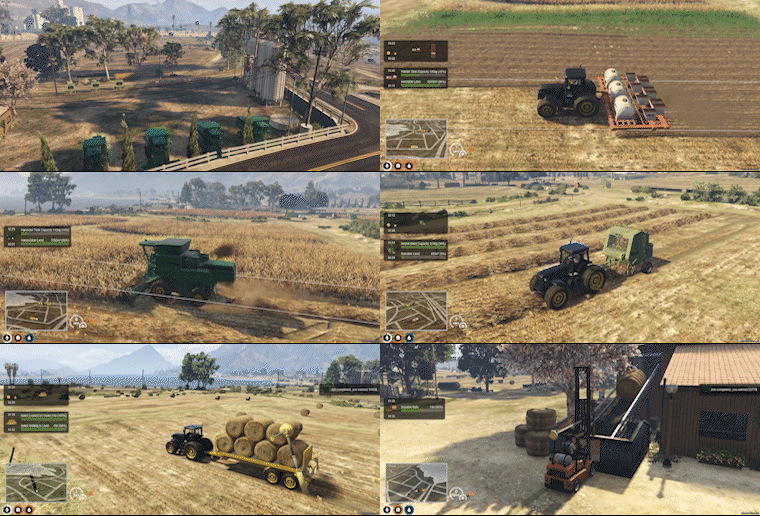
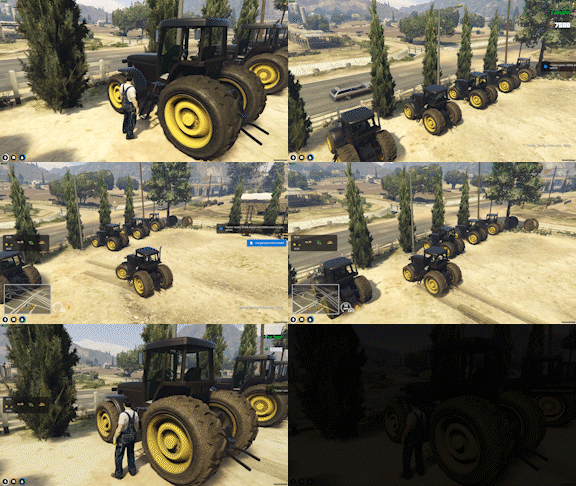
 Players must rent a tractor before they can rent a planter, baler, or bale trailer.
{% stepper %}
{% step %}
##  Seeding with Planter
 Players rent a planter using their rented tractor and head to available farmland to begin planting. The seed tank of the planter has a limited capacity. When it runs out, players must refill it at the seed silo. Before completing the job and returning the planter, the tank must be refilled.
***
{% endstep %}
{% step %}
##  Harvesting with Harvester
 Players rent a harvester and head to harvest-ready fields to begin working. The harvester's tank has limited capacity; when it becomes full, they must return to the center and unload it into the silo. To complete the job, the tank must be emptied before returning the vehicle.
***
{% endstep %}
{% step %}
##  Baling with Round Baler
 Oyuncular kiralamış oldukları traktörle bir balyalama makinası kiralarlar. Balyalama yapmaya hazır araziye gidip çalışırlar. Balyalama makinasını teslim ederek işi sonlandırırlar.
***
{% endstep %}
{% step %}
###  Collecting Bales with Trailer
 Players use their rented tractor to rent a baler and head to a field ready for baling. They begin working and complete the job by returning the baler.
***
{% endstep %}
{% step %}
###  Storing Bales with Forklift
 Players rent a forklift to transport bales from the trailers to the storage area.\ They complete the job by returning the forklift.
***
{% endstep %}
{% endstepper %}
***
## 🚜 Vehicle Rental System
To start working, players must rent a tractor, planter, harvester, baler, bale trailer, or forklift.\ A deposit is charged during the rental process and refunded if the vehicle is returned properly.
If the player leaves the server, disconnects, or moves too far away from the vehicle, the rental is automatically cancelled. In such cases, the vehicle is deleted and the deposit is not refunded.
When a vehicle is first rented, a rental fee is also charged. As the rental time progresses, the system continues to charge rental fees automatically.
These two systems ensure that players do not occupy vehicles unnecessarily and help maintain balanced server resource usage.
***
## 🌾 Field and Row System
This system is designed with a farm management logic in mind.\ Players work on the farm and receive payment for each completed task.\ They are free to choose any stage they want, work as much as they like, and stop whenever they wish.
Fields operate based on a row system.\ Once a player starts working on a row, they are required to complete it entirely.\ Each row consists of multiple parcels, and each parcel is prepared to contain a crop object.\ When a player finishes a row, they are automatically paid based on the number of parcels completed.
The farming process is divided into the following stages:\ **Planting → Harvesting → Baling → Bale Collection → Bale Storage**\ Players can participate in any of these stages independently. Each stage involves a different rented vehicle, used in a realistic manner.
All stages are independent but support collaboration.\ For example, one player can plant a field, another can harvest it, a third can handle baling, someone else can collect the bales, and finally, another player can transport them to storage.\ This allows the farming process to be completed in sequence by multiple players.
This system encourages teamwork and allows the farming workflow to be dynamically distributed among players.
# Technical information
I have optimized the script as much as possible, but achieving perfect performance is not always feasible in a system with this many detailed objects.
First of all, the script only runs for players who are within the active farming area.\ Vehicles and field objects are not spawned for distant players, which helps prevent unnecessary resource usage.\ When outside the active area, the script's CPU usage remains at **0.00**.
When a player enters the area and vehicles begin to spawn, or any action is performed on the field, CPU usage ranges between **0.01 and 0.04**.\ When the script is fully active — during planting, harvesting, or baling — CPU usage increases to around **0.05 to 0.12**.
If players disable object animations through in-game settings, active CPU usage can drop to around **0.02 to 0.05**.
When multiple players are working simultaneously, the number of spawned vehicles and objects increases, which can lead to FPS drops.\ To reduce this, I’ve implemented several in-game optimization toggles that players can control manually.
Additionally, there’s a setting to reduce object density.\ Instead of spawning all crop and straw objects, only the ones at the beginning of each row are spawned. This greatly reduces the number of scene objects and minimizes performance loss.
If only two or three players are working in the same area, FPS drops are barely noticeable.
### 📊 Resmon Results
* Outside the active area: **0.00 CPU**
* During vehicle spawning or field interaction: **0.01 – 0.04 CPU**
* With markers and drawtext enabled: **0.04 – 0.06 CPU**
* During active work: **0.05 – 0.12 CPU**
* During active work with object animations disabled: **0.02 – 0.05 CPU**
While the script maintains very low CPU usage under normal conditions, usage may increase depending on the number of active players and spawned objects.
# Payment and Boss
## 💵 Payment System
Players receive payment for each row they complete. The total amount is calculated by multiplying the number of parcels in the row by the payment value per parcel.
**Example:**\ If a row contains 30 parcels and the planting job pays 52 per parcel, the player earns\ **30 × 52 = 1560**.
Payment rates can be adjusted via the `PLT.Payments` table inside `config.lua`.\ Each job type (planting, harvesting, baling, etc.) has its own configurable payment value.
Additionally, `config.lua` defines how many parcels a player can complete per hour for each job stage.\ When the script is restarted, the server console prints estimated hourly income and rental costs based on those values.
***
## 🏢 Company System
The script is integrated with a company account system.\ The company balance is automatically updated based on all player payments and rental transactions.
* Salaries paid to players are deducted from the company account.
* Rental fees paid by players are added directly to the company account.
* Deposits paid by players are also transferred to the company. If the vehicle is not returned, the deposit remains with the company.
Additionally:
* Grains harvested and bales collected by players are stored in the company warehouse.
* The company owner can sell these grains and bales to generate income.
* The sale prices for grains and bales can be configured via the `config.lua` file.
When the script is restarted, product sale costs (based on player wages) are calculated and printed to the server console.\ This cost estimation assumes players work at optimal speed. However, if they idle or fail to return vehicles, they may pay extra rental fees or lose their deposit — which results in extra profit for the company.
There is also a dedicated **Discord Webhook** system for company management.\ All salary payments, rental income, deposit transactions, sales, and cash withdrawals are logged in detail via Discord Webhook for server admins.
***
## 🖥 Information Printed to Server Console
When the script starts, based on your config settings, the following information is printed for each job (Planting, Harvesting, Baling, Bale Loading, Bale Storage):
#### **💰 ****Player Earnings**
For each job: estimated hourly gross income, rental costs, and net profit are calculated.
#### **💰**** ****Product Costs & Sale Profits**
The unit production cost of each product (e.g., wheat or hay bale) is calculated.\ Sale prices are retrieved from the config file, allowing the system to adapt automatically if prices change.\ By comparing production costs and sale prices, the company’s profit per unit is determined.\ This helps admins clearly understand how much profit the company earns indirectly through player activity.
#### **📦** **Additional Info**
Other details such as total company balance, silo stock levels, and logs of past salaries and rental income are also printed to the console.\ Defined managers (Boss IDs) are listed in the logs.
# Security and Webhoks
Whenever a player rents a vehicle, all financial actions such as the deposit fee, rental charges, refund upon return, and payments made for completed jobs are automatically logged to Discord via webhook.
Additionally, a system designed for server managers (bosses) provides detailed Discord Webhook logs for the following actions:\ player payments, deposit collection, cash withdrawals from the company account, and grain or bale sales.
## 🧾 Rental Validation System
To ensure security during vehicle rental and return operations, various validation checks are performed.
When renting a vehicle, the server verifies:
* Whether the vehicle is available for rental
* Whether the player is close enough to the rental point
Similarly, when returning a vehicle, the server checks:
* If the player has actually rented that specific vehicle before
* If the player is near the designated return coordinates
If any of the following conditions are detected:
* The player is too far from the required location
* The client sends incorrect or manipulated data
* The vehicle is not eligible for rental
* The player attempts to return a vehicle they never rented
The action is blocked, and a detailed alert is sent to server admins via Discord Webhook.
This system helps prevent abuse of the rental system and ensures maximum server security.
***
## ✅ Task Validation System
During the planting, harvesting, and baling stages, several validation checks are performed both when players begin a row and when they complete it.
Before a player begins working on a row, the server performs the following validations:
* Checks whether the player is close enough to the first parcel of the selected row
* Verifies the accuracy of the client-side arguments sent by the player
* Confirms that the selected row is suitable for the intended farming stage (planting, harvesting, or baling)
Before completing a row, the server performs the following checks:
* Verifies that the player is at the correct coordinates
* Confirms the accuracy of the client-side arguments
* Checks whether the player has previously started that specific row
During the bale collection stage (with a trailer), the following additional checks are performed:
* Verifies that the player is close to the correct parcel of the selected row
* Checks whether a bale actually exists on that parcel
During the forklift transport phase to the storage area, the following checks are performed:
* Verifies that there is actually a bale at the trailer spot the player is trying to pick from
* Checks whether the player is in the correct position to pick up the bale with the forklift
* During delivery, confirms whether the player has previously picked up a bale using the forklift
If any inconsistency is detected during these validations, the action is canceled and the event is reported in detail to server admins via Discord Webhook.\ This system ensures that row entry and completion processes are securely managed and helps prevent potential abuse.
# Modelling
The crop, bale, and similar objects used during the job process were taken from in-game assets, edited, and optimized for use.
## 🚜 Vehicle Modelling
The vehicles used in the script were optimized using some custom modifications based on the original GTA V game assets:
* **Tractor**: The original game tractor model `tractor2` has been modified and used.
* **Planter (Seeding Machine)**: The `prop_sprayer` and `prop_plough` objects were modified and integrated into the `tractor2` vehicle.
* **Harvester**: A special add-on vehicle was added.
* **Round Baler (Baling Machine)**: The `prop_roundbailer01` model from the game was modified and turned into a vehicle with a trailer.
* **Bale Trailer**: The original game trailer model was used.
* **Forklift**: The existing forklift model was adjusted to fit the script system.
All vehicles were adjusted as Add-ons to avoid conflicts with other files.
There are no trademark issues related to the vehicles used. The Planter and Baler machines use original in-game props and models such as "Brute" and "HVY" logos, which are already part of the original game files.
## 🌱 Field Adjustments
The terrain of all farming areas has been adjusted to make it more suitable for gameplay. The surfaces of the fields have been flattened and optimized to ensure players can work comfortably.
## 🌾 Farming Objects
The crops, bales, and similar objects used during work were taken from the game, modified, and optimized for use.
A total of 40 assets are added.\ Polygon values range from 100 to 600.
## 🏡 Interior & Exterior
In the MLO interior, appropriate areas use the original GTA V prop objects. Additionally, objects taken from the GTA V ranch house and the Cayo Perico Island interiors have been adjusted and placed to fit the scene.
Outside the MLO area, 90% of the objects used are original game objects from the same region. These objects have been relocated and adjusted to fit the new scene.\ Additionally, some trees, lighting, and decorative objects have been added to enhance the atmosphere of the scene.
A total of 45 assets are added.\ Polygons: 12 objects (0–1K), 12 objects (1K–2.5K), 11 objects (2.5K–5K), 4 objects (5K–10K), 3 objects (10K–15K)
# Installation
* Put the plt\_lumberjack & plt\_lumberjack-streams files in your resource file. Add them to your server.cfg.
* Check the config.lua. and configure to script settings how you want.
* If you are using ESX or QB-Core frameworks; you don't have to make any changes. it is ready to work. Otherwise check [#Framework money & job functions](#framework-money-and-job-functions)
* The script has no requirements. ui and notifications itself. if you want you can use other notification system. check [#Notifications system](#notifications-system)
* If you want to do something when vehicle spawns, like giving a key to the player, changing the fuel of the vehicle or something [#Arrangement about spawned vehicles](#arrangement-about-spawned-vehicles)
* You should set the outfit values according to your own server [#Clothing System](#clothing-system). The clothes changing system can work standalone. If you want, you can use the qb-clothing or esx\_skin system.
* [#Add new tree](#add-new-tree)
* [#Add new construction](#add-new-construction)
## Framework money & job functions
{% tabs %}
{% tab title="ESX & QB-Core" %}
{% hint style="info" %}
If you are use ESX & QB-Core frameworks you don't need to change or add anything, they already been added.
{% endhint %}
{% code title="server/server.lua" %}
```lua
function PltAddMoney(src,money,transactionType,operationType,operationId)
if ESX then
local xPlayer = ESX.GetPlayerFromId(src)
if not xPlayer then return print(src, "Couldn't get paid for logging out of the game or something went wrong:"..money) end
xPlayer.addAccountMoney('bank', money)
--xPlayer.addMoney(money)
elseif QBCore then
local xPlayer = QBCore.Functions.GetPlayer(src)
if not xPlayer then return print(src, "Couldn't get paid for logging out of the game or something went wrong:"..money) end
xPlayer.Functions.AddMoney('bank', tonumber(money), 'farmer-payment')
--xPlayer.Functions.AddMoney('cash', tonumber(money), 'farmer-payment')
end
--[[
--transactionType = "Deposit" or "Payment" or "BossWithdraw"
--operationType = "Forklift" "BaleStoring" "Harvester" "Harvesting" "Tractor" "Planter" "Planting" "RaundBailer" "RaundBaling" "BaleTrailer" "BaleLoading"
local parcel =
if transactionType == "Payment" then
--local xPlayer = ESX.GetPlayerFromId(src)
--xPlayer.addInventoryItem("itemName",totalParcel)
--local xPlayer = QBCore.Functions.GetPlayer(src)
--xPlayer.Functions.AddItem("itemName", totalParcel)
if operationType == "Planting" then
local totalParcel = math.floor(money / PLT.Payments.Planting)
elseif operationType == "Harvesting" then
local totalParcel = math.floor(money / PLT.Payments.Harvesting)
elseif operationType == "RaundBaling" then
local totalParcel = math.floor(money / PLT.Payments.RaundBailing)
elseif operationType == "BaleLoading" then
local totalParcel =1
elseif operationType == "BaleStoring" then
local totalParcel = 1
end
elseif transactionType == "Deposit" then
if operationType == "Tractor" then
elseif operationType == "Planter" then
elseif operationType == "Harvester" then
elseif operationType == "RaundBailer" then
elseif operationType == "BaleTrailer" then
elseif operationType == "Forklift" then
end
elseif transactionType == "BossWithdraw" then
end
]]
end
```
{% endcode %}
{% code title="client/jobs.lua" %}
```lua
RegisterNetEvent('esx:playerLoaded')
AddEventHandler('esx:playerLoaded', function(PlayerData)
JobUpdate(PlayerData.job.name,PlayerData.job.grade)
end)
RegisterNetEvent('esx:setJob')
AddEventHandler('esx:setJob', function(job)
JobUpdate(job.name,job.grade)
end)
RegisterNetEvent('QBCore:Client:OnPlayerLoaded', function()
local QBCore = exports['qb-core']:GetCoreObject()
while QBCore.Functions.GetPlayerData().job == nil do Citizen.Wait(1000) end
local PlayerData = QBCore.Functions.GetPlayerData()
JobUpdate(PlayerData.job.name,PlayerData.job.grade.level)
end)
RegisterNetEvent('QBCore:Client:OnJobUpdate')
AddEventHandler('QBCore:Client:OnJobUpdate', function(JobInfo)
JobUpdate(JobInfo.name,JobInfo.grade.level)
end)
```
{% endcode %}
{% endtab %}
{% tab title="vRP 0.5" %}
{% hint style="info" %}
Delete the ESX and QB-Core function before,
I added the necessary codes, but they are comment lines, activate the codes.
{% endhint %}
{% code title="fxmanifest.lua" %}
```lua
server_scripts {
'@vrp/lib/utils.lua',
...
}
```
{% endcode %}
{% code title="server/server.lua" %}
```lua
local Tunnel = module("vrp", "lib/Tunnel")
local Proxy = module("vrp", "lib/Proxy")
vRP = Proxy.getInterface("vRP")
function PltAddMoney(src,money)
local user_id = vRP.getUserId(src)
vRP.giveBankMoney(user_id,money)
end
AddEventHandler("vRP:playerSpawn",function(user_id, source, first_spawn)
if first_spawn then
local job = vRP.getUserGroupByType({user_id,"job"})
TriggerClientEvent('plt_lumberjack:JobUpdate',user_id,job,false)
end
end)
AddEventHandler("vRP:playerJoinGroup", function(user_id, group, gtype)
if gtype == "job" then
TriggerClientEvent('plt_lumberjack:JobUpdate',user_id,jobName,false)
end
end)
```
{% endcode %}
{% endtab %}
{% tab title="Other frameworks" %}
{% hint style="info" %}
Delete the ESX and QB-Core function before, add the following function to give money in your own framework.
{% endhint %}
{% code title="server/server.lua" %}
```lua
function PltAddMoney(src,money)
-- add "money" amount of money to the player whose id is "src", for example;
-- local xPlayer = ESX.GetPlayerFromId(src)
-- xPlayer.addMoney(money)
end
```
{% endcode %}
{% hint style="info" %}
Job information should be updated when the player loaded and player's profession is updated, as in the example following
{% endhint %}
{% code title="from any where" %}
```lua
--following is when will trigger from CLIENT side.
TriggerEvent('plt_lumberjack:JobUpdate',jobName,jobGrade)
--following is when will trigger from Server side.
TriggerClientEvent('plt_lumberjack:JobUpdate',source,jobName,jobGrade)
```
{% endcode %}
{% hint style="info" %}
I added the event that will be triggered, you don't need to do anything about it.
{% endhint %}
{% code title="client/jobs.lua" %}
```lua
RegisterNetEvent('plt_lumberjack:JobUpdate')
AddEventHandler('plt_lumberjack:JobUpdate', function(jobName,jobGrade)
JobUpdate(jobName,jobGrade)
end)
```
{% endcode %}
{% endtab %}
{% endtabs %}
## Clothing System
{% code title="client/clothing.lua" %}
```lua
---- Adjust the 'PLT.Clothing' table following according to the job clothes on your server.
PLT.Clothing={
male ={
--[[ Arms ]] ['arms'] = 67,
--[[ Tshirt ]] ['tshirt_1'] = 85, ['tshirt_2'] = 0,
--[[ Torso Parts ]] ['torso_1'] = 177, ['torso_2'] = 11,
..
},
female={..}
}
function ChangeOutfit()
ChangeOutfitStandalone()-- if you want to use the esx_skin or qb-clothing system; Deactivate the this function then Activate the following which you want.
--ChangeOutfitEsx() -- if you want to use the esx_skin system; Deactivate the ChangeOutfitStandalone() function then Activate the this function.
--ChangeOutfitQB() -- if you want to use the qb-clothing system; Deactivate the ChangeOutfitStandalone() function then Activate the this function.
TriggerEvent("plt_lumberjack:ClotheChangeAnim")
end
```
{% endcode %}
## Notifications system
{% tabs %}
{% tab title="Notification System" %}
{% code title="client/other.lua" %}
```lua
function Notification(type, message, time)
SendNUIMessage({statu="single", type = type, text = message, duration = time})
--exports['mythic_ notify']:DoCustomHudText(type, message, time)
--exports['okokNotify']:Alert("Lumberjack", message, time, type)
--TriggerEvent('okokNotify:Alert', "Lumberjack", message, time, type)
--TriggerEvent('QBCore:Notify', message, type, time)
end
```
{% endcode %}
{% endtab %}
{% tab title="Permenant Notification System" %}
{% code title="client/other.lua" %}
```lua
function permenantNotification(msg, thisFrame, beep, duration)
permenantNotificationText = msg
--[[ AddTextEntry('pltLumberjackNotify', msg)
if thisFrame then
DisplayHelpTextThisFrame('pltLumberjackNotify', false)
else
if beep == nil then beep = true end
BeginTextCommandDisplayHelp('pltLumberjackNotify')
EndTextCommandDisplayHelp(0, false, beep, duration or -1)
end ]]
end
```
{% endcode %}
{% endtab %}
{% endtabs %}
## Arrangement about spawned vehicles
{% code title="client/other.lua" %}
```lua
function SpawnedVehicle(vehicle, needGiveKey, vehicleModelName)
if needGiveKey then
TriggerEvent("vehiclekeys:client:SetOwner", string.gsub(GetVehicleNumberPlateText(vehicle), '^%s*(.-)%s*$', '%1'))
TriggerServerEvent('garage:addKeys', GetVehicleNumberPlateText(vehicle))
TriggerServerEvent("plateEveryone",GetVehicleNumberPlateText(vehicle))
if vehicleModelName == PLT.Vehicles.forklift or vehicleModelName == PLT.Vehicles.telehandler then
SetVehicleFuelLevel(vehicle, 99.9) DecorSetFloat(vehicle, "_FUEL_LEVEL", GetVehicleFuelLevel(vehicle))
else -- here for trucks
SetVehicleFuelLevel(vehicle, 99.9) DecorSetFloat(vehicle, "_FUEL_LEVEL", GetVehicleFuelLevel(vehicle))
end
--next line vehicle max car mod
--SetVehicleMod(vehicle, 11, (GetNumVehicleMods(vehicle, tonumber(modType)) - 1), false) SetVehicleMod(vehicle, 12, (GetNumVehicleMods(vehicle, tonumber(modType)) - 1), false) SetVehicleMod(vehicle, 13, (GetNumVehicleMods(vehicle, tonumber(modType)) - 1), false) SetVehicleMod(vehicle, 15, (GetNumVehicleMods(vehicle, tonumber(modType)) - 1), false) SetVehicleMod(vehicle, 16, (GetNumVehicleMods(vehicle, tonumber(modType)) - 1), false) ToggleVehicleMod(vehicle, 18, true)
end
end
```
{% endcode %}
## Add new tree
{% embed url="